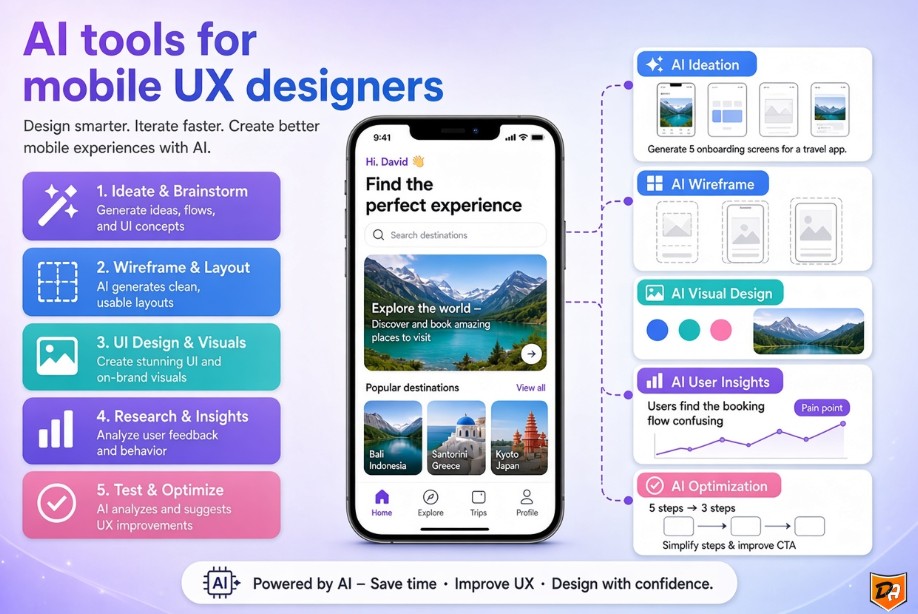
Artificial intelligence is not replacing UX designers—it is empowering them with smarter tools, faster prototyping cycles, and data-driven insights to create deeply human-centered mobile experiences. By offloading mechanical tasks, designers can focus entirely on high-level strategy, empathy, and creative problem-solving.
Key Roles of AI in Mobile UX Design
- Curator AI: Suggests relevant options based on direct user behavior and interaction history.
- Advisor AI: Learns from user actions in real-time to guide them toward optimal outcomes and conversion paths.
- Orchestrator AI: Collaborates seamlessly across multiple touchpoints and channels to achieve cohesive user outcomes.
- Workflow Optimization: Automates repetitive wireframing tasks and generates design solutions instantly, freeing up designers for creative execution.
- Personalized User Experiences: Analyzes user behavior dynamically to adapt interfaces and deliver tailored content (similar to how media apps curate recommendations).
- Conversational Interfaces: Enables voice and chat interactions, expanding traditional UI boundaries with native voice assistants and intelligent chatbots.
- Accessibility Improvements: Helps identify accessibility bottlenecks early in the design process to ensure inclusive app experiences.
AI Tools and Platforms for Mobile UX Designers
1. Design Generation & Prototyping
- Uizard: Turns hand-drawn sketches, wireframes, or text prompts into editable digital mockups and prototypes using features like Autodesigner and Screenshot Scanner.
- Sleek: A mobile-first design tool that generates professional mobile app screens specifically for iOS and Android, with direct export to Figma layers or React code.
- UX Pilot: An AI assistant that generates app interfaces and user flowcharts from text descriptions to simplify rapid prototyping.
- Figma AI with UX Pilot plugin: Enhances collaborative team workflows directly inside Figma.
- Google Stitch: A free AI design canvas from Google Labs that translates prompts, sketches, or voice into web and mobile UI.
- Wireframe Designer: A dedicated Figma plugin that generates wireframe layouts from simple text prompts.
- Lovable, Miro AI, Banani AI, v0, Reforge, and Magic Patterns: Powerful generation engines for building UI components and prototypes from text prompts or existing products.
2. User Research & Analysis
- Maze: An AI-first platform handling prototype testing, surveys, and AI-moderated user interviews with automated synthesis.
- Perspective AI: Excels in the product discovery phase by running AI-moderated interviews that capture the underlying "why" behind user actions at scale.
- Listen Labs: Handles large-scale AI-moderated interviews, managing recruitment, moderation, transcription, and thematic synthesis.
- Lookback: A qualitative research platform featuring built-in AI transcription and automated summarization via its 'Eureka' AI assistant.
- UserTesting: Connects teams with on-demand participant panels and delivers automated video highlights.
- Dovetail: Focuses on advanced AI tagging and cross-project theme analysis to synthesize qualitative research data efficiently.
3. Development & Handoff
- a0.dev and Rork: Specialized AI builders that take polished mobile designs and prepare or compile them smoothly for app store submission.
Conclusion
As artificial intelligence continues to mature, its integration into mobile UX design is shifting from an experimental novelty to an essential pillar of modern product development. By combining the speed of automated generation with deep behavioral user research, designers can iterate faster, test ideas with higher confidence, and ultimately deliver more intuitive mobile experiences.
Frequently Asked Questions: AI for UI/UX Design
1. Can ChatGPT create UI design?
Yes, ChatGPT can create UI design concepts, wireframes descriptions, component suggestions, color palettes, layout ideas, and even generate detailed prompts for tools like Figma, Midjourney, or Galileo AI. It cannot produce final production-ready visual files by itself, but it is excellent for ideation, copy, user flows, accessibility checks, and turning text descriptions into structured design specifications. Many designers use ChatGPT as a brainstorming and documentation partner for UI work.
2. Can I use AI for UX design?
Absolutely. AI is now widely used in UX design for research synthesis, persona generation, user journey mapping, wireframing, usability testing analysis, content strategy, and rapid prototyping. Tools such as ChatGPT, Claude, Figma AI, Uizard, Galileo AI, and Relume help UX designers move faster while still applying human judgment for strategy, ethics, and final decision-making. AI augments rather than replaces professional UX work.
3. Which AI is best for UX designers?
There is no single "best" AI—the strongest results come from combining tools:
- ChatGPT or Claude: Research, personas, journeys, content, and critique
- Figma AI / Magician / Relume: Interface generation and design systems
- Uizard or Galileo AI: Turning sketches or text into editable designs
- Midjourney or Adobe Firefly: Visual exploration and mood boards
Most professional UX designers currently get the highest value from ChatGPT/Claude for thinking work + Figma's native AI features for execution.
4. Which AI is best for mobile app UI design?
For mobile app UI specifically, the leading options in 2026 are:
- Galileo AI and Uizard: Excellent at generating mobile screens from text prompts
- Figma AI + community plugins: Best for production-ready, editable mobile components and design systems
- ChatGPT or Claude: Strongest for writing detailed mobile UI specs, responsive behavior, and accessibility notes that you then implement in Figma
- Visily or Banani: Strong specialized mobile-focused generation
Many teams use ChatGPT to define the mobile experience and then generate the actual screens in Galileo AI or Figma AI.