Table of Contents
- Introduction
- 1. Arise (Customer Service Contracting)
- 2. KellyConnect (Technical Support & Service)
- 3. Gaggle (Student Safety & Content Review)
- 4. Paidwork (Micro-Tasks & Micro-Earnings)
- 5. Toptal (High-Tier Freelance Tech & Finance)
- 6. Transcription Hub (Audio & Video Transcription)
- 7. Preply (Online Language Tutors)
- 8. Omni Interactions (Gig Customer Support)
- 9. Rev (Transcription & Captioning)
- 10. TaskRabbit (Local & Remote Service Gigs)
- 11. Swagbucks (Surveys & Activity Rewards)
- 12. NexRep (Virtual Contact Center Services)
- 13. Clickworker (Micro-Tasking & AI Training)
- Conclusion
The Rise of AI App Development in 2026
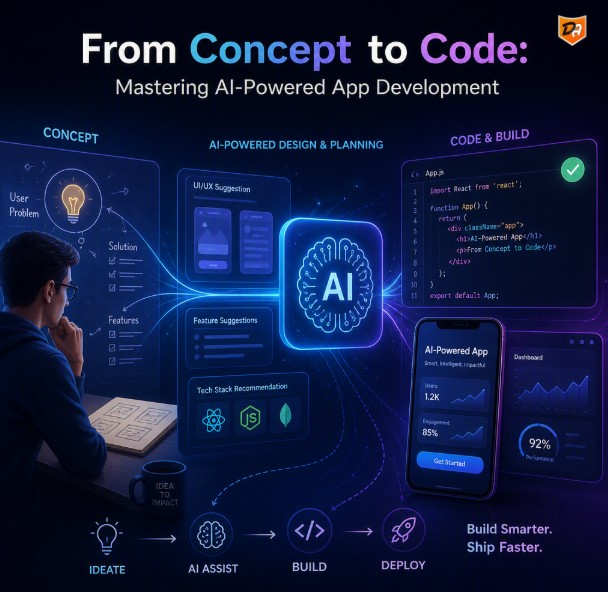
Building applications has fundamentally shifted from manual code scaffolding to AI-assisted logic and native AI model integration. AI app development is the process of embedding artificial intelligence, machine learning models, and large language model (LLM) APIs directly into mobile and web software to create dynamic, adaptive user experiences.
Whether you are building cross-platform apps for iOS and Android or high-concurrency web services, mastering modern AI app architecture is critical for scaling performance while controlling API overhead.
Step 1: Architectural Planning & Choosing Your AI Stack
Before writing a single line of code, you must decide where your AI intelligence will live: in the cloud or on the client device.
Cloud APIs vs. On-Device AI Models
- Cloud APIs (OpenAI, Anthropic, Gemini): Best for complex reasoning, broad multi-modal tasks, and low client resource usage. However, they introduce latency and recurring API costs.
- On-Device ML (CoreML, TensorFlow Lite): Ideal for real-time processing, zero API expenses, and offline functionality. Best suited for smaller, specialized tasks on iOS and Android devices.
Recommended AI Tech Stack
- Frontend: React Native, Swift, or Flutter for multi-platform mobile coverage.
- Backend: Node.js / Express or Python (FastAPI) for API orchestration and streaming responses.
- Database & Vector Search: PostgreSQL (pgvector) or Supabase for retrieval-augmented generation (RAG).
Step 2: Integrating Core AI Capabilities into Mobile Apps
Adding true value with AI in app development means moving beyond simple "ChatGPT wrappers." Modern AI mobile applications leverage intelligent context and structured data flow to enhance core user features.
Structuring Prompts for Scalable UI Components
To render AI output cleanly inside mobile components, force your models to respond with strict JSON schemas rather than unstructured text. This ensures seamless parsing directly into your app state.
- Conversational UX: Streaming real-time tokens to prevent UI blocking.
- Predictive Workflows: Smart search auto-completion and personalized feed recommendations.
- Visual AI: Native image recognition and on-device camera input processing.
Step 3: Security, Data Privacy, and Production Deployment
Deploying AI applications to production requires robust server-side safeguards to protect user data and your infrastructure API keys.
- API Key Hardening: Never embed private AI keys inside mobile frontends. Always route requests through a secure backend proxy or serverless function.
- Rate Limiting & Cost Control: Implement user quotas and caching layers to prevent abuse and manage API token consumption.
- Privacy & Compliance: Ensure user data sent to external AI providers adheres to privacy frameworks like GDPR.
Conclusion: Building the Future of Intelligent Mobile & Web Applications
Mastering AI-powered app development is no longer about simply querying a model—it’s about architecting systems that balance user privacy, performance, and operational efficiency. As edge processing capabilities expand across iOS and Android devices, the line between cloud intelligence and client-side execution will continue to blur, enabling faster, highly secure, and cost-efficient applications.
By establishing robust server-side proxies, enforcing strict response schemas like JSON, and strategically leveraging hybrid cloud and on-device AI models, you position your application for scalable, long-term growth. As generative AI and multi-modal models evolve, the developers who combine thoughtful software architecture with intelligent model orchestration will lead the next generation of digital products.
Frequently Asked Questions About AI App Development
1. How much does AI app development cost?
Costs vary depending on architecture. Prototype cloud API usage starts at a few dollars per month, while custom fine-tuned model hosting and enterprise mobile app production can range higher depending on server requirements and user traffic.
2. Can you build a full mobile app using AI tools?
Yes. Developers frequently leverage AI coding assistants (such as Cursor or GitHub Copilot) to accelerate boilerplate development, though human oversight is still required for security, database design, and state management.
3. What are the best languages for AI mobile app development?
Python is standard for backend AI workflows and model handling, while TypeScript (React Native), Swift (iOS), and Kotlin (Android) lead multi-platform mobile frontend engineering.